Every byte counts
Posted

Over the past month, I have been working on optimizing a key part of Costa - the launcher, COSTA.EXE. The launcher is the program you run when you want to start Costa. It stays in memory at all times, including when running external programs such as games or DOS utilities, and because of this, it’s absolutely vital to keep it as small as possible to preserve memory for other programs.
The purpose of the launcher is to run whatever program the user wants. When it is run, it will first run the desktop. When the desktop wants to run another program, for example a game the user has clicked on, it writes information about what to run to a temporary file, and then exits. The reason it exits is to preserve memory - with only 640 KB base memory to share between DOS, applications and drivers, every byte of memory counts. Take up too much, and some of the users games or programs might not be able to run because of low memory. That’s why the desktop doesn’t just launch programs directly.
Once the desktop has exited, the launcher checks if the temporary file exists, and reads the data in it. It then runs the requested program, waits for it to exit, and re-loads the desktop. Every time the desktop exits, Costa checks for a specific exit code returned by the desktop. If that error code was returned, it is a signal to the launcher to exit itself and return the user to the command prompt.
In older versions of Costa, the launcher didn’t exist. Instead, Costa was launched via a batch file, COSTA.BAT, which changed to the right directory, set some environment variables needed by Costa, and launched the desktop. This worked fine, but had one major drawback: For it to be able to launch the desktop, it needed to know exactly where on the disk it was located. If Costa was started from its own directory, eg. C:\COSTA, then there was no issue. But what if the user was in the root of the drive, and launched Costa by running the command COSTA\COSTA.BAT? A batch file cannot reliably determine its own location, and thus cannot launch programs unless it knows where they are located, or their path is included in the PATH environment variable. For that reason, I created a small utility that could update the batch file with full paths. This worked fine, but made Costa non-portable unless the utility was run each time the path changed. It also wasn’t a very elegant solution.
So, a while back I wrote a program to replace the batch file. Coding it in BASIC like the rest of Costa was out of the question - Microsoft’s Visual BASIC for DOS produces far too big EXE files for something like a launcher. So, instead I chose to write it in Turbo Pascal, which is a much more optimized language with far less overhead. This was quite a detour from the past, as Costa has always been written entirely in BASIC. Why not the C programming language? Well, I’ve always had a soft spot for Pascal. It was the first programming language I used, back when I was maybe 11-12 years old.
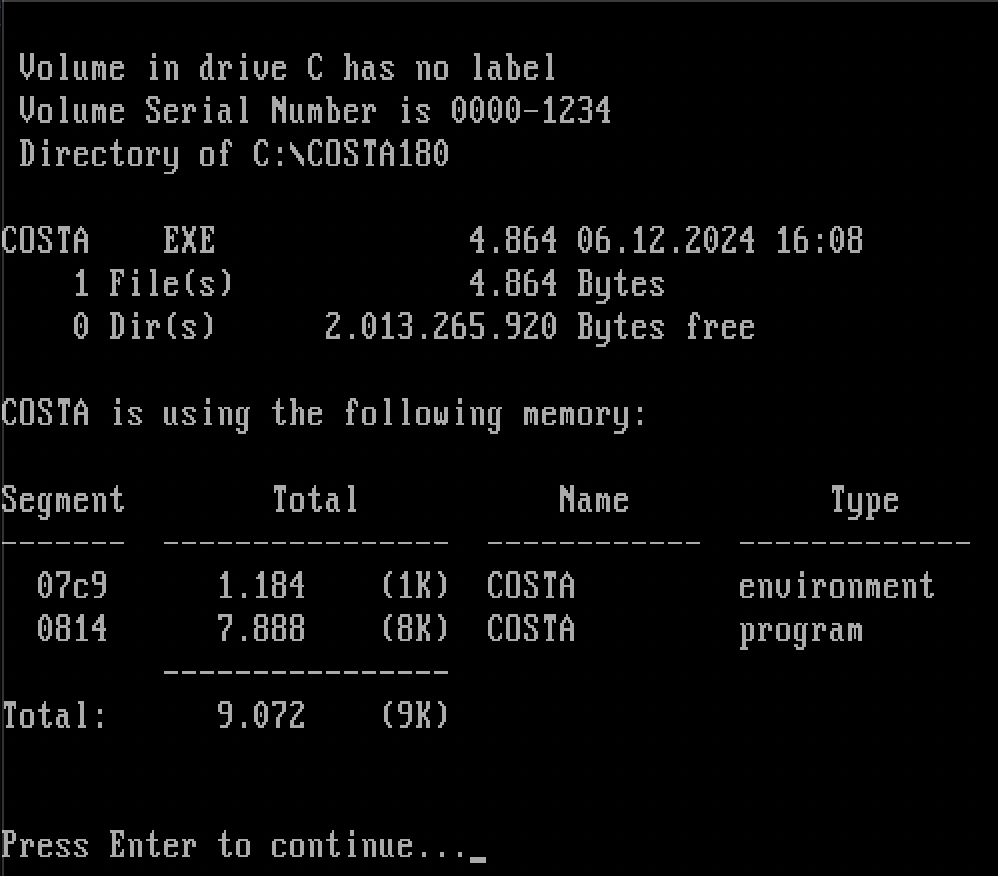
Using this method, I managed to create a fairly small launcher. As you can see from the screenshot above, it takes up what amounts to 4.75 kilobytes. That’s pretty decent. Runtime memory usage sits at 8.85 kilobytes. While that’s certainly not much, remember that DOS only has 640 kilobytes available in total. On a pretty base DOS installation I have, with barely any drivers, I have 608 kilobytes available. 8.85 kilobytes out of that amounts to 1.45% memory used by the launcher. Suddenly, it sounds like a lot more, and I wanted to squeeze it even tighter.
I’ve been wanting to dive into Assembly programming for years. It’s a very low level language, meaning it doesn’t have any built-in functions to speak of. Rather than including libraries with default procedures like most other languages, you have to write almost everything yourself. And you have to do it in a manner where you tell the CPU exactly what to do - what addresses in memory to manipulate, what data to put in CPU registers etc.
The downside to Assembly is that it is more difficult to get started with, and writing programs takes more time and requires more thought and care to not mess anything up, as the language will allow you to do almost anything you tell it to, without safeguards. The big upside is that since it doesn’t include a lot of pre-made code, there’s as good as no overhead to the programs you write in it. Since they only include what you write, nothing more, you don’t have any code you don’t need.
An example of what I am talking about is the WriteLn procedure in Pascal. You can use it to print text to the screen, followed by a line break:
WriteLn('Hello, world');
Simple and easy. The thing with WriteLn is that it can do various things that I don’t need in the launcher. Nifty if you need it, wasted bytes if you don’t. In Assembly, there’s no procedure to write text to the screen. But you can point a CPU register to the location of your text in memory, put a value MS-DOS interprets as “write text on the screen, please” and then call a software interrupt to have DOS do your bidding. It’s difficult to explain without diving into how the CPU, memory and DOS operate, but an example of how to perform the same task as WriteLn above could look like this (code simplified for demonstration, won’t run on its own):
MSGHELLO db 'Hello, world$'  ; Defines text we can use later on

lea dx, [MSGHELLO]   ; Load the memory address of the text to CPU register
mov ah, 09h          ; 09h in another register tells DOS we want to print text
int 21h              ; Calls DOS to execute our write request
As you can see, the code is more complex to write than in Pascal. It looks longer, but that’s only because WriteLn hides all the code that really happens behind the scenes from us. The Assembly version is smaller in the final program, and takes up less memory. There’s absolutely nothing there that we don’t need. This was just one example for one specific thing. When you add all the procedures you use in Pascal up, even though they are very effective and well-written, the result is many bytes saved by using Assembly.
Rewriting the launcher in Assembly took me a month, because I needed to learn how to properly use Assembly along the way. I am by no means an expert at this point, but I have the basics down and I’m still working on improving the code I’ve written so far.
Other than switching from Pascal to Assembly for coding the launcher, I also made some changes to the logic of it, and to how it stores data - all in the name of optimization. Some examples:
I’m not fully satisfied with the launcher yet - I still have some things I want to improve - but it’s working perfectly at this stage. And it’s a lot smaller than the Pascal version, as you can see:
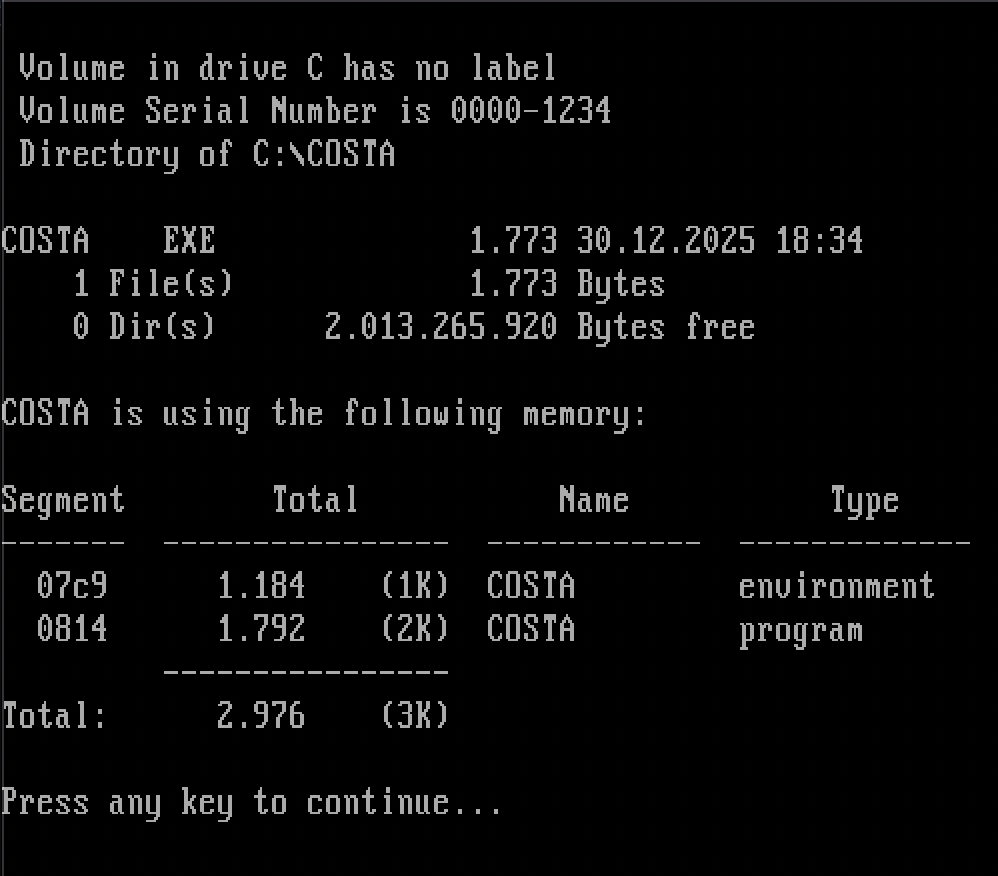
It’s down to 1.73 kilobytes on disk, a reduction of 64%. The memory it occupies when it is loaded is down to 2.91 kilobytes, a reduction of 67%. That’s pretty wild, and it is for sure the smallest program I have ever written. I’m curious to see how much further I can squeeze it, though I imagine it won’t be much. But, every byte counts!
Expect to see the new launcher in the next release of Costa, which will bring a complete rewrite of all code - not in Assembly, though, but in Pascal. As mentioned earlier, Pascal is vastly superior to BASIC in terms of size and speed, and its object-oriented features fit a GUI perfectly. Writing it all in Assembly, while possible, would be a massive undertaking, so I’m opting for a simpler but still far better language. More news on that in the future.