New release on the horizon
Posted
It’s been a while since I’ve posted here or since a new version has been released, so I decided to give an update on the progress of the development of Costa. It’s still going strong, although being a hobby project, I tend to develop in bursts when time and other factors allow it. But, a new release is on the horizon, with some thorough optimizations!
As mentioned in my last blog post, the launcher - which is the part of Costa that stays in memory when you run your programs and games - has been rewritten in Assembly language. I have also made a lot of optimizations to it, including reducing the amount of data it holds in memory and moving some of the checks it previously performed to the desktop program. For example, it used to check if the path and program existed before running a program, but now the desktop does this before instructing the launcher to run a program. Any logic that can be moved out of the launcher results in a smaller program.
Since that blog post, I have also changed the executable format from an EXE to a COM program. COM programs are smaller but more limited, but since the launcher is so tiny, this has no effect on it. On top of that, I have been inspired by the MS-DOS 1 and 2 source code released by Microsoft, and implemented a trick similar to what they did with COMMAND.COM back in the day. All the code that the launcher runs when it first starts only needs to run once, so keeping it in memory is just wasted bytes. So, what I did was move all of that code to the end of the program, and then when the launcher has initialized and has no further use for the code, it calls the DOS API to shrink itself, marking all the initialization code as free memory for other programs.
At the time of writing, the launcher occupies 1.249 bytes of disk space, and run-time memory usage is 1.392 bytes. Yes, that’s bytes, not kilobytes. There will always be some overhead at runtime due to the way DOS handles programs, so you can expect somewhere between 2-6 KB of RAM usage for Costa while running your programs and games.
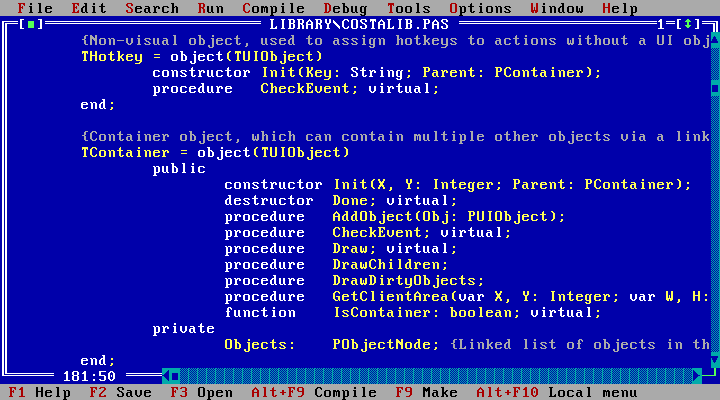
I know - I had promised myself not to start from scratch again. But I really wanted to push performance while reducing requirements, and BASIC just wasn’t the language for the job. There are several programming languages I could have chosen from, but since Pascal was very widespread back in the DOS days and I want to use the tools of the period, it felt like a good match. It was also the first language I used, so it brought back some fond memories.
I went with Borland Turbo Pascal, since I own a boxed copy of Turbo Pascal 7.0 with all documentation. Newer Pascal variants exist, such as Free Pascal which is a wonderful language, but Turbo Pascal is as I said a tool of the period. It also targets 16-bit x86 computers which is one of my design goals. Going 32-bit would ease development, sure, but programming within the confines of the 16-bit architecture is half the fun for me.
Turbo Pascal has many advantages over Visual Basic for DOS. The code compiles to native code instead of using a run-time module and bytecode like BASIC, and the compiler is much better at optimizing code. It even strips out unused code, meaning programs that for example don’t use the messagebox, simply won’t have any of that code them. The language is Object-Oriented, allowing to define buttons, textboxes and such as real objects with properties and methods. This is extremely well suited to GUI development, and has allowed me to build a UI library that is vastly more refined than what I had before. The list could go on, but to sum up - Turbo Pascal is vastly superior in every way. More complex to code in at times, yes, but easily worth the effort.
Rewriting everything has been a huge undertaking, and in this day and age I feel obligated to specify that it was not done using AI. Some of the initial conversion from BASIC to Pascal was assisted by GitHub Copilot for conversion of trivial code, but mostly done by hand. After the conversion almost everything has been rewritten, and for that part no AI has been used at all. The point of developing Costa isn’t to ship some product at reduced cost or to optimize development efficiency, it’s a hobby project to me like woodworking or painting. A skill that I want to learn by practicing it. And I have no problem spending days on a problem I could probably have solved with AI in minutes, because when I do solve it myself, I feel a sense of achievement and can be proud of the solution I’ve come up with. Vibe coding Costa would have robbed me of that feeling.
Professionally I use AI at times because it makes a lot of sense in a business to reduce development time and ship things faster. So, I’m neither pro AI nor anti AI in general. It’s just not a tool I want to use for Costa, because I feel it would take away all the tinkering and sense of achievement that I enjoy so much, and that has kept my hobby project alive for 22 years.
For the next version, I have not worked on any new features. The primary focus has been to get everything working as before after the rewrite, and then optimizing everything I could think of. And the results are showing.
While I haven’t measured speed, I can say that Costa feels snappier and that the desktop and the accessories launch notably faster. The size on disk of the program files have been reduced from 802 KB in version 1.8.0 to at present 440 KB. That’s a reduction of 45% disk space, and something I’m quite proud of. For users with small hard drives, or those who might run Costa from a floppy, that extra space will come in handy. Part of the speed increase naturally comes from this reduction of size - smaller programs load from disk faster.
Once the next release is out, I can start working on new features. I haven’t decided on what yet, but I’m thinking it’s maybe time for Costa to get some sort of file manager.
I have finished all features, and now it’s all about testing and finding and fixing bugs. Now I’m testing on DOSBox-X, virtual machines running a whole string of different DOS versions from different vendors, and on three physical PCs (a 386, a 486 and a Pocket 386). I don’t expect it to be completely bug-free, no software ever really is, but I want to catch as many bugs as I can before I release anything.
So keep an eye out for a new release here on the website, or follow the pascal_conversion branch in the Codeberg repository to see code changes as I go along. As always, all source code is freely available under the MIT license.